
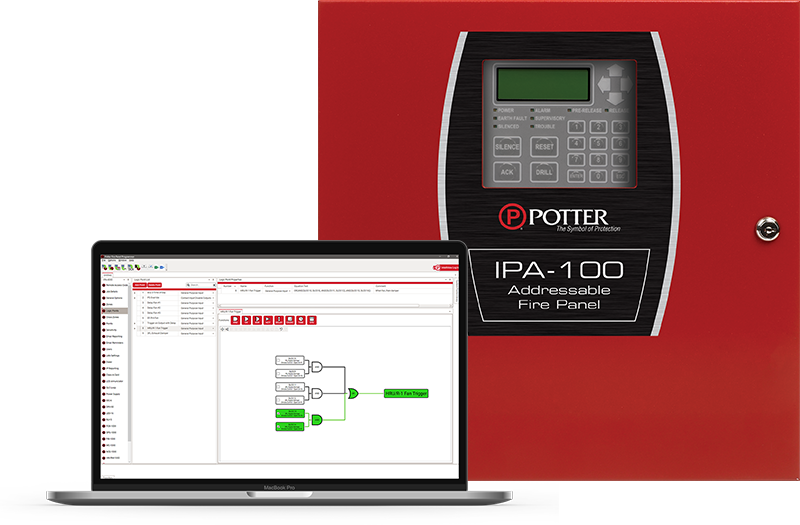
 We are excited to announce the release of Logic Point Programming, a new feature built into Potter’s Fire Panel Programmer, allowing eligible ESD users to visually create software-defined Logic Points and assign them within zone programming across supported panels. Using a flexible, drag-and-drop canvas, programmers can build layered relationships that create highly customized, building-specific sequences.
The visual logic designer displays the complete relationship controlling each Logic Point’s state in a single visual space. Once defined, the Logic Point becomes available through the System Points Library and can be added to a zone as a named General Purpose Input—turning detailed, point-level relationships into customized system behavior within Potter’s established zone-programming workflow.
“A field-performed firmware update gives existing supported panels advanced programming capability that can reduce the need for additional hardware. It’s a small change that creates powerful new possibilities.”
Key features and benefits:
- Visual, drag-and-drop creation of multi-condition, multi-level relationships
- A complete visual representation of the relationship controlling each Logic Point’s state
- A built-in simulator for manually activating inputs and observing gate and function outputs
- Bidirectional synchronization between the visual logic designer and equation text
- Text-based equation entry and an Excel-supported editing workflow
- Named, software-defined Logic Points that can be assigned to zones as General Purpose Inputs
- AND, OR, XOR, NAND, NOR, XNOR, and NOT operators, plus Delay, Count, Time, and System Status functions and conditions
- Logic Point names and comments that help preserve programming intent and context
Logic Point Programming is available to eligible Potter ESD users on supported IPA and AFC series panels, the ARC-100, and the PFC-4064. Large panels support up to 200 Logic Points and 800 logic gates; small panels and the PFC-4064 support up to 50 Logic Points and 200 logic gates. Existing supported panels can gain the capability through an updated Fire Panel Programmer and a field-performed firmware update.
For more information on Logic Point Programming and technical documentation click here.